General Product Guidelines
General Product Guidelines for Uploading Products
C-MES 3D Models is a curated marketplace. Every model is reviewed to ensure quality, build buyer trust, and support fair competition among creators.
Below you will find the minimum requirements for approval and publishing your products.
File Requirements for 3D Models
You can upload any number of file formats for your product. Supported formats include:
3D Models: .3DS, .FBX, .OBJ, .MB (Maya), .C4D (Cinema4D), .DAE (Collada), .GLB, .GLTF, .3DM (Rhino), .DXF, .SKP (SketchUp), .USD, .USDZ, .MAX (3ds Max), .BLEND (Blender).
Textures & Graphics: .PSD (Photoshop), .PNG, .JPG, — commonly used for textures, previews, and environment maps.
Archives: .ZIP (single compressed archive containing all product files).
ℹ️ If your product includes additional files in other formats (for example: .MA, .TIFF, .TGA, .EXR, .HDR, .AI (Illustrator), Unreal Engine — .USH, .USF, .MAT. Unity — .shader, .cginc. etc.), they can be included in the archive, but be sure to mention them in the product description.
Naming Requirements for .MAX and .BLEND Files
If your product includes files in the .MAX or .BLEND formats, the following rule must be strictly followed:
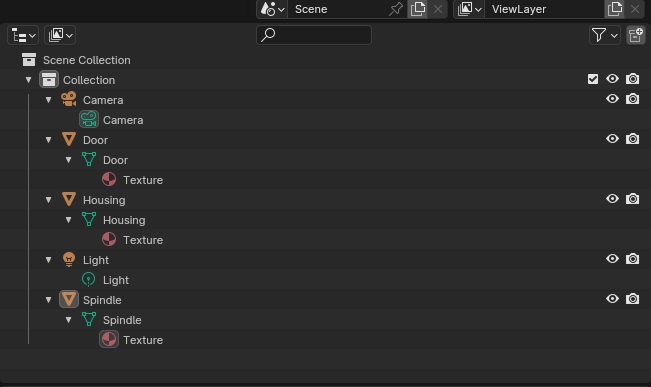
All parts of the product must be named in English. Ideally, these names should be logical and easy to understand.
- Meshes
- Materials
- Textures
- Rigs / Armatures
- Bones
- Scenes
- Collections / Groups
For other formats such as Maya, Unreal Engine, Unity, Cinema4D, SketchUp, or Rhino, this naming rule does not apply, but clear and logical naming is still recommended to ensure ease of use for buyers.
Example: Of proper organization and naming in a Blender file
Packaging Textures and External Files
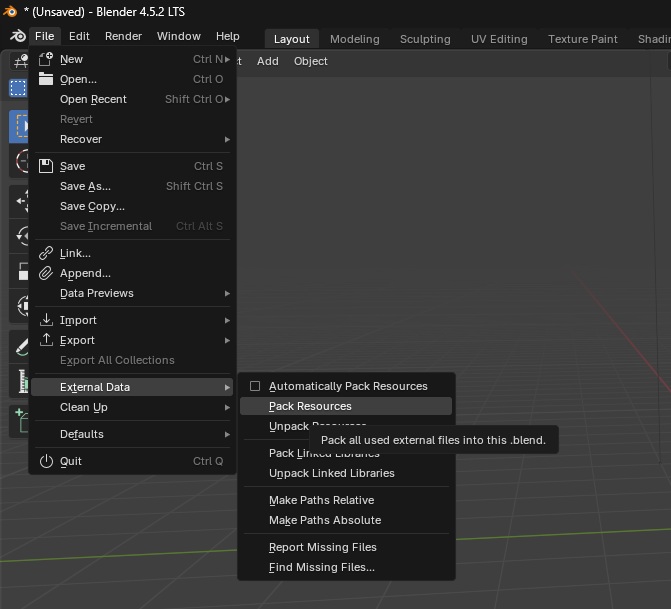
If your product uses external textures, models, shaders, or other resources, make sure to package them properly:
- Include all resources inside the .blend or .MAX file or place them in a separate folder named Textures and compress it for upload.
- Make sure that all external textures are correctly linked in the 3D file.
- Remove any unused textures, materials, or meshes from the final .blend or .MAX file to keep it clean and optimized for buyers.
Packaging Guidelines
- Folder Structure: Use clear folder organization, e.g., Textures, Reference, Extras.
- Texture Optimization: Avoid unnecessarily large textures (e.g., use 2K instead of 8K when sufficient).
- Software Compatibility: Ensure files open correctly in supported programs (Blender, 3ds Max, Maya, etc.).
- Quality Check: Verify that materials, textures, and meshes work as intended before upload.
Example: How to properly package all external files in a Blender file
Products Must Be Render Ready
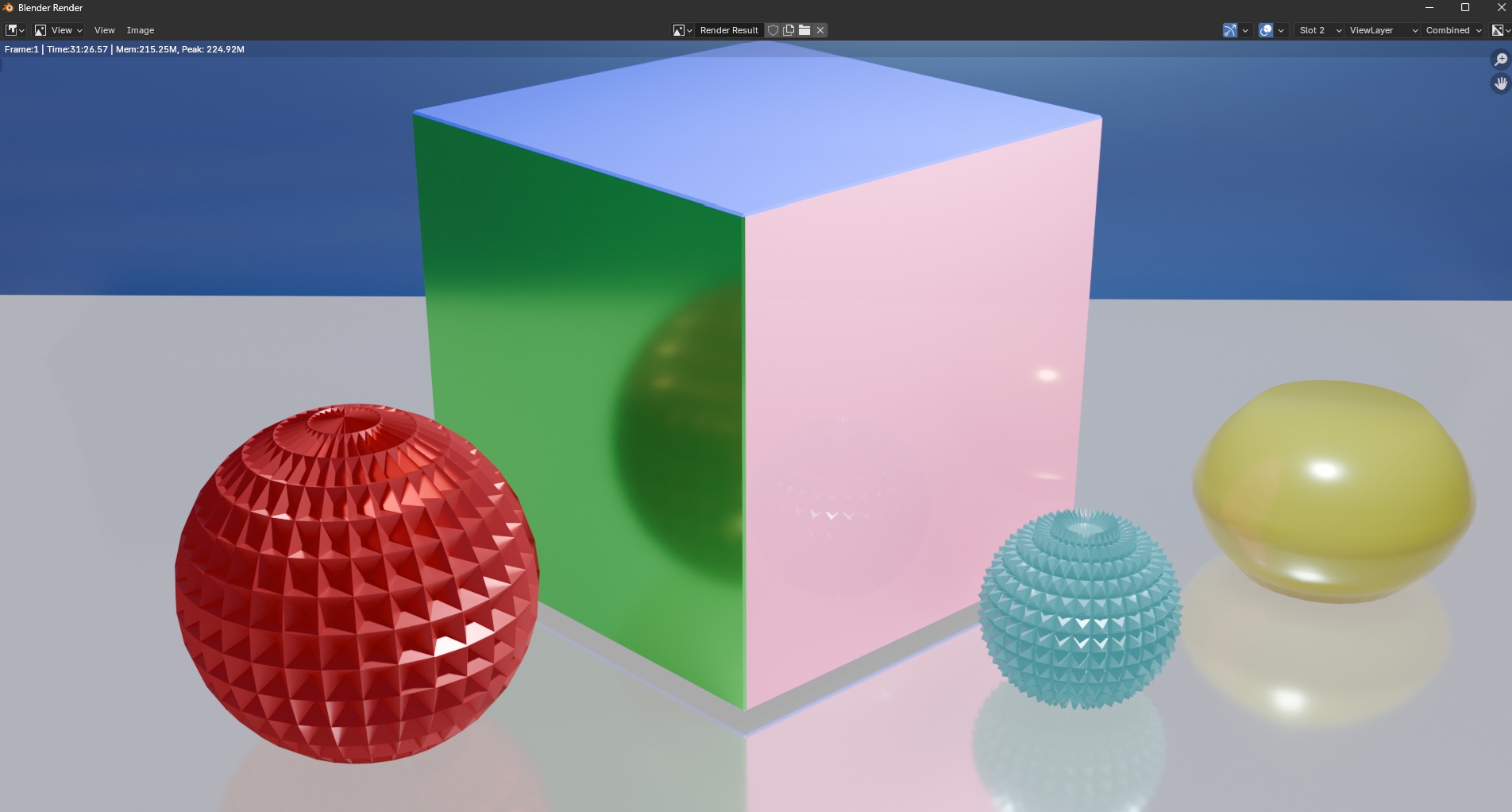
All 3D products must be fully prepared for immediate rendering by buyers. This ensures a smooth experience and maintains the quality standards of the marketplace.
Key Requirements:
- Materials and Shaders: All materials must be properly assigned and correctly configured. Shaders should render as intended.
- Textures: All textures must be correctly linked, optimized, and ready for rendering.
- Lighting: The scene must include proper lighting for immediate rendering.
- Cameras: Include at least one camera positioned for clear renders of the product.
- Complete Assets: No missing meshes, textures, rigs, or other resources.
Recommendations:
- Test your scene by rendering it in the target software to ensure it looks correct.
- Keep naming and organization clear for all objects, materials, and textures.
- Avoid unnecessary complexity that may slow down rendering or cause errors.
Example: Render-ready Blender scene setup
Include a screenshot showing the materials, lighting, and camera ready for immediate render.
File Size & Model Optimization
We do not currently limit the size of uploaded .ZIP archives.
All product files should be included inside a single .ZIP for upload.
Recommendations :
- For faster uploads and downloads, we recommend keeping each archive under 1 GB when possible.
- For high-poly models (over 1,000,000 polygons/triangles), consider providing an additional lower-poly version. Many buyers prefer optimized models for animation, visualization, and game engines.
- Remove unused geometry, cameras, or lights from your scene to reduce file size and improve usability.
3D Textures (for Rendering, Games, Animation)
3D Textures must accurately represent materials such as metal, wood, leather, stone, and other surfaces. Each texture should include a full PBR set — Base Color, Normal, Roughness, Metallic, AO, and Height maps — to ensure proper shading and realism. Acceptable formats are PNG, TGA, JPEG/JPG or TIFF, always lossless and preserving alpha channels where needed. JPEG is not recommended for PBR textures due to compression and detail loss, but can be used for previews or non-critical cases.
Textures should follow standard powers-of-two resolutions, typically 1K, 2K, 4K, and optionally 8K. Proper UV mapping is required for all textures — missing or incorrect UVs may cause stretching, misaligned details, or rejection during moderation.
3D Texture Guidelines:
- For faster uploads and smoother performance, keep individual texture files reasonably sized.
- Provide multiple resolutions (1K, 2K, 4K) so buyers can choose according to their needs.
- Avoid including unused maps or extra files in the archive.
- Clearly label each texture map (e.g., BaseColor.png, Normal.png) for easier workflow integration.
- Include a preview render or example application of the texture to showcase its use in a real scene.
Product Page Requirements
1. To make your product stand out on the platform, it must include at least 5 high-quality images.
Guidelines for Product Renders:
- Ensure high-quality, realistic lighting and materials in all renders.
- Use a consistent style across all images to create a professional and harmonious appearance.
- Avoid unnecessary background clutter; focus on the product itself.
- Provide wireframe or schematic views to highlight the model’s structure.
- Optimize image sizes for fast loading without compromising visual quality.
2. Image Aspect Ratio and Format
Images can have any aspect ratio.
But a 4:5 ratio is preferred to help your product stand out and appear professional. Both PNG and JPG formats are perfect for this purpose, with a minimum width of 1200 pixels for your images. This format is particularly crucial for advertising campaigns on social media, as Instagram only accepts JPG images with a 4:5 aspect ratio.
Image Format Recommendations:
- Maintain a 4:5 aspect ratio for images designed for social media, especially for the 2nd and 3rd images.
- Ensure all images meet the minimum resolution standards for clarity and a polished look.
- Use PNG for images requiring transparency and JPG for standard images.
- Avoid excessive compression to retain image quality for advertising purposes.
3. Provide an Informative and Descriptive Product Description
The product description is often overlooked, so don’t take it for granted. If you’re unsure of what to write, here are a few recommendations:
- Focus not only on technical specifications but also on how your product solves problems and enhances the life of your ideal customer.
- Write as if you are addressing your target audience directly, using a tone that aligns with your brand—whether serious, playful, or artistic.
- Avoid vague marketing phrases like "high-quality" or "innovative." Instead, specify the features and benefits.
- Help customers envision using your product by describing real-life situations and experiences involving it.
- If possible, briefly share the purpose of the product, its development, or testing to add personality and build trust.
4. Product Information Must Be in English
Most buyers come from the US, UK and other English-speaking regions. To reach your audience, maximize sales conversions, and maintain consistency across the platform, make sure all product information is provided in English. This builds trust with buyers and ensures your product gets the visibility it deserves.
5. Add External Preview Links (Sketchfab, YouTube)
If you have additional previews of your product, such as interactive 3D models on Sketchfab or video demonstrations on YouTube, make sure to include these links on your product page. This allows buyers to rotate, zoom, and explore your product from all angles, or see it in action before purchasing.
External previews increase buyer confidence and make your product stand out on the marketplace.
Support Requirements
1. Be Kind and Respectful
Customers are the people who pay for your product. Always strive to be responsive, polite, and professional in your communication — even if the customer’s tone is not the same. This approach helps you maintain a flawless reputation, build long-term trust, and often results in positive reviews and repeat buyers.
2. Respond promptly
When a customer reaches out through support, make it a priority to reply as soon as possible. Remember, they are paying for your product and your work. While time zones may differ, the standard expectation is to provide a response within 48 hours to ensure a positive buying experience.
